Filed Under: Technical SEO Resources, Indexing
Summarize this Post using AI





Crawled currently not Indexed is a common indexing issue whereas many webmaster face this issue in Google Search Console, in Page Indexing report. In this article, we will define what is this issue, what are the possible causes for Crawled Currently Not Indexed and recommended fixations you can just apply right after finishing this article.
Before diving deep into our article if you are a big ecommerce store or SaaS website and having indexing issues you can request my Ecommerce Technical SEO Services and Technical SEO Audits in order to fix your Crawled and not indexed pages if you want to dedicated this to a technical SEO Consultant rather than DIY, which is good fit for small to medium websites.
What Is Crawled Currently Not Indexed Issue?
Crawled currently not indexed is an indexing issue which shows in Google Search Console in Pages report settings, which means Googlebot successfully Crawled this page but didn’t decide to include it in the Search Index. Like shown in the image below
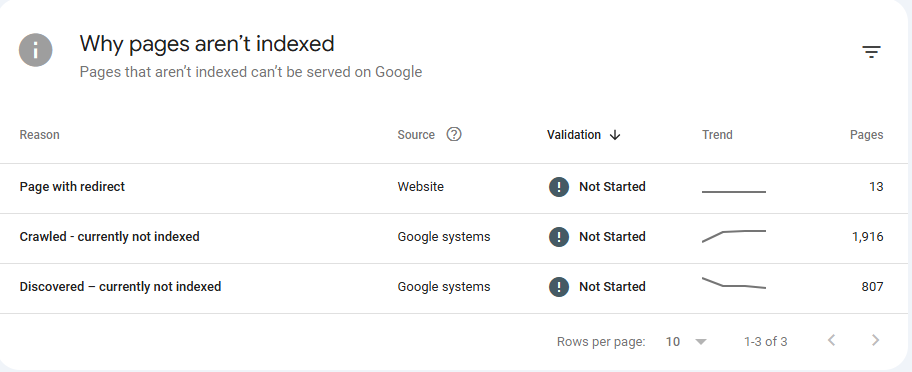
Screenshot From Page Indexing Report from Google Search Console showing “Crawled – Currently not indexed” issue.
As it shown in the Screenshot above from a website I personally Own (not for client), it shows that there are 1,916 URLs “Crawled – currently not indexed” and there are 2 main sides for this issue : Your website and Google systems.
By the way this project was a demonstration for Programmatic SEO and I How I executed on pSEO campaign at the scale of ~3.5K URLs and later on I will write a case study on it and why it failed in indexing and immediately nearly ~2K URLs have been deindexed after indexing almost 33% of this website in the course of ~10 Days.
Crawled – currently indexed from Google systems means that Googlebot as abovementioned crawled the URL successfully and decided not to include this URL in Search Index. While, Crawled – currently indexed from Website’ end means that the website has issues and must be resolved before validating fix.
Before proceeding with the next section about recommended fixations for Crawled – currently not indexed issue and how to force Google to re-index these pages which has been excluded by Google systems, refer to my Indexing Guide as there are information commonly mentioned in this guide and also here.
How to fix ‘Crawled – currently not indexed’ Issue?
The fixations that will be mentioned here I personally implemented on a small scale of the abovementioned case-study, but until wrapping it up into a full case study. Let’s explore actionable tips you implement right away on a small sample of URLs which marked as ‘Crawled – currently not indexed’ to make this pages into Google’ Search index.
Important Note : The points below represent the core causes for the ‘Crawled – currently not indexed’ status. I have listed them under ‘Possible Fixation Angles’ to systematically address and resolve the issue.
Create high-quality content
First and foremost, investing in high quality content is the only way to survive everything in Google algorithm, that’s why it’s highly recommended to refer to Google Search Central and read their guide about “E-E-A-T” which stands for Experience, Expertise, Authoritativeness and Trustworthiness.
They are not measured metrics like Core Web Vitals, other they are self-questions to yourself when publishing or creating new piece of content, they are set of criteria and best practices which prompts publishers to clearly declare : Who is behind this Creative work, What is this website, what are other online sources saying about this brand, does this work provides real information with fist-hand experience and many more factors.
Creating high-quality content is your free pass to getting to index at no cost
Why? because, that’ how Search Engine Crawlers are programmed and designed, to eagerly seek to new information which are published on new webpages on daily basis, and even within seconds tons of hundreds webpages are published and without the proper bare minimum of Technical SEO, your new published pages won’t get into index.
Why and how, I created high-quality content.
The content alone is not enough without the small thread which is connecting or transforming your beautiful work into technically-issues-free webpage Search bots can easily crawl and index.
Make sure the pages are not marked as ‘noindex’
One of the biggest issues that can be a barrier for indexing is “Noindex” tag, which can be added at 3 levels :
- Noindex at the robots.txt
- Method : Disallow directive
- Noindex using HTML Meta tag
- Method : In the
<head>section of the webpage
- Method : In the
- Noindex using HTTP Header
- Method : Declaring Noindex tag using .htaccess rules
header('X-Robots-Tag: noindex, follow');
- Method : Declaring Noindex tag using .htaccess rules
Noindexing tag is a straightforward and self-explanatory tag which is a direct signal for bots not to include this page in search index. Wise and logic uses for noindex tag : My Account Page, Create Account (If You have sign-in system), Payment processing page, API Endpoints and many other resources for the sake of security and privacy, it’s highly recommended not to be included in the Search Index or allowed to be indexed.
After the Crawling phase, Search Crawlers later on can encounter noindex tag which to them is direct and explicit word to bots “Don’t index this page in search” and due to that this tag can be still there due to caching issues, it’s high preferable to purge Server cache to allow bots to see new changes happened to HTML which includes the removal of ‘noindex’ tag.
Make sure Googlebot can see the actual content (Rendered View)
Rendered view is what the people see, not just codes : HTML, CSS and JS, instead these codes gets compiled together to make the page viewable with no broken elements, this whole process is called ‘Rendering’. Sometimes, after Googlebot crawls the website or a specific webpage within a website the rendered source code of the webpage can be very costly to index and serve it for users.
Why? the answer for this question is something called “Page Resource Load” which something I have already covered in my Crawl Budget article.
In essence, page resource load can be checked from within Google Search Console -> Settings -> Crawl Status -> Scroll down to last card “By Googlebot Type” -> You will see Page Resource Load like shown in the image below also for the project mentioned above.
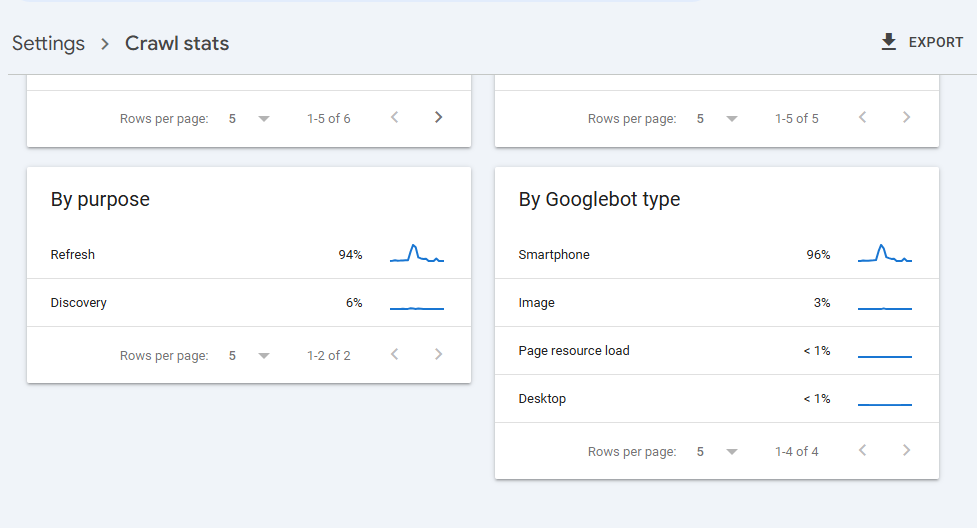
Screenshot showing Page Resource Load from Crawl Settings section.
Interpretation for the above image is : Googlebot consumes 1% or less in Page Resource Load execution and compilation to render a single webpage, which is a very good sign from only the Technical SEO Aspect.
But what about my Content aspect for this project? Repetitive blocks of text across almost the entire 3.5K Pages, resulted in immediate drop from indexing after managed to indexed ~800 URL in the course of ~10 Days from launching this project and submitting it to Google Search Console.
I have explained a little bit into the project rather than aligning to the topic ‘Crawled – currently not indexed’, but as I told you above “These are a Possible causes for this issue” as when batching some of the issues like : adding some unique content, internal links wisely sprinkled across the pages and other adjustments, I saw after these edits Googlebot began to hit again these pages through checking the bot activity on my Server Logs through (AWStats).
You can refer to my article about “Log File Analysis for SEO” where I discussed in deep how you can find discrepancies between Crawled – currently not indexed and your Webserver logs.
Make sure the page has valid HTML Structure
Actually this fixation angle for ‘Crawled – currently not indexed’ issue I personally consider it as a double checking layer, which means it can give the less impact , if all fixations were executed successfully. Valid HTML Structure refers to the Semantic use of HTML tags based on their placement in page.
For example, Navigation header should be marked with <nav> HTML tag, Sidebars
should be marked with <aside> HTML tag which represents a secondary content
widget, Footer should be marked with <footer> HTML Tag and the list go on you
can personally yourself refer to the full list of Semantic HTML Tags.
Search Engines can rely solely on Valid and Semantic HTML Structure to understand your website and structured data (Schema) here is not a necessary to rank you on the first spots, they are just enhancement for your Search Appearance.
In essence, making your HTML is semantically structured and valid will increase your webpages chances to escape this ‘Crawled – currently not indexed’ issue or not fall in it’s trap at all.
Make sure the pages have unique content
One of the most common issues which can cause ‘Crawled – currently not indexed’ is that your website have near or exact repetitive elements across many webpages, elements such as : text block, widget, specific div, same or near same titles or meta descriptions and there are many cases.
Understanding when Google applies “Duplicate Content Filter” is important when investigating such issue, as ‘Crawled – currently not indexed’ is directly tied down and correlates with this topic. In particular, by mistake you can have thousands of URLs which are not intended to be indexed, will eventually get indexed.
How? Through the uncontrolled indexation can cause this Indexing bloat which accordingly will affect and dilute important pages from being indexed. A Good example for this, If you a have a specific product which is accessible at : domain.com/product/product-name and this product have a color variable accessible at ?color=red then Google will parse these 2 URLs totally different :
- domain.com/product/product-name (For Google Unique URL)
- domain.com/product/product-name?color=red (For Google Unique URL Also)
And if you have another variation, for example size ?size=large and if the user chose both filters together this will result in :
- domain.com/product/product-name?color=red&size=large (This another Unique URL Also)
But the URLs with variations are just small tweaks for the page elements : Color changed and for Size almost nothing will change, result? Thousands of URLs that are semi-duplicate in their content (Which is practically true) -> Leading to A sufficient URLs will be thrown into ‘Crawled – currently not indexed’ bucket.
Screenshot from Google Search Central explaining how “Duplicate Content” is calculated and applied on websites and based on which criteria.
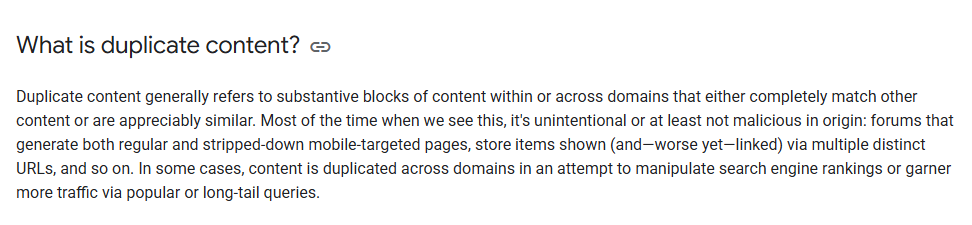
Screenshot From Google Search Central explaining what is duplicate content filter and when it applies on websites.
Make sure the pages are Internally Linked
Pages with no internal links to Googlebot means they are not important as other pages, from this point we can conclude a fact ‘Lots of orphaned pages probably will contribute to Crawled – currently not indexed’.
Solution? Creating a hub-spoke model between category pages, subtopics and siblings topics back to category pages and vice-versa. In Practical words, for example if you have “Technical SEO Category” below it there are 4 subcategories : Indexing, Crawling, Rendering and Ranking.
Now, I wrote an Article about Google ranking microsystems, then it’s very logic to link to ranking more alike than linking to rendering or indexing, as you already in the ranking phase, which means Google already included you in the index.
So, it’s not indexing issue it’s “Ranking Issue” and from that point the best relevant internal link will go back to “Ranking” subcategory. Now, we applied the Hub-Spoke model like this :
Hub (Technical SEO Category) -> Spoke (Ranking) -> Sibling/Cluster (Google Ranking Microsystems).
Internal links will be explained later on in a dedicated article as it’s a very important factor in making Google and any Search engine to be able to understand what your website is willing to tell and they are much more than Indexing signals or so, they are much powerful than that.
Use Temporary Sitemap as sample validation batch
To be honest, while researching to write this article I’ve found a very good resource on the same topic at ‘Onely Blog’ and actually this fix step is inspired by Tomek Rudzki (Personally I didn’t try it yet) but worth investigation. (Here is a link to this section)
In particular, after implementing all the above checks and partial fixations (When available to your access to resources) you can create a temporary Sitemap file in with set of URLs where which you implemented these fixations on before scaling on the rest of ‘Crawled – currently not indexed’ pages.
How Do I Force Google Bot To Reconsider ‘Crawled – currently not indexed’ pages again to be Recrawled?
This is the most important thing to make Googlebot to see new changes we have implemented which we discussed above in order to tackle Crawled – currently not indexed issue and escape this bottleneck.
Luckily, since we are dealing with “Algorithm”, then the steps are not a guesswork, rather it’s a systematic approach and sequential steps we will take it together to force Google to Recrawl these URLs and getting them ready to be indexed.
The official “Validate Fix” Button In Page Indexing Report
Now, we have implemented the recommended fixations we have discussed to tackle the “Crawled – currently not indexed” issue, the first thing to do after fixing these issues to getting these pages into Search Index, we will go to : Page Indexing -> Crawled – currently not indexed -> Validate Fix , like shown in the image below.
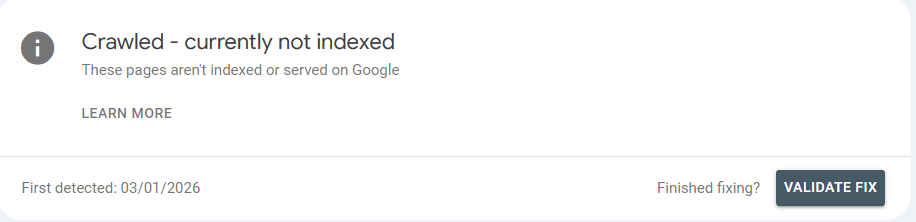
Screenshot showing how to ‘Validate Fix’ through page indexing report after fixing Crawled – currently not indexed issue.
The Validation process takes anything between couple of days to week or more, depends on the amount of webpages which have been crawled and not indexed.
Updating “Last Modified” Timestamp In XML Sitemap
While the “Validate Fix” button is a direct request, we shouldn’t rely on it alone. We need to feed Googlebot the correct signals through our technical infrastructure, specifically the XML Sitemap.
The XML Sitemap serves as a roadmap for the Crawler, and the <lastmod> tag is
our way of waving a flag to say, “Hey, something new happened here.” If we have updated the
content to fix the quality issues or thin content that caused the “Crawled – currently not
indexed” status, but the Sitemap still shows an old date, Googlebot has little incentive to
prioritize a recrawl.
Therefore, we must ensure that our CMS or Sitemap plugin automatically updates the
<lastmod> timestamp to reflect the exact date and time of our latest changes.
This synchronization is crucial because it aligns the “Algorithm” logic with our actual on-page
improvements, signaling that the page is fresh and ready for a second look.
Adding “Last Updated” Timestamp In HTML Code and Schema Markup
We must ensure that the “Freshness” signal is consistent across all layers of the page, not just in the Sitemap. If Googlebot sees a new date in the XML Sitemap but finds an old date on the page itself, this creates a conflict in signals.
To align these signals, we need to implement the dateModified property within our
Schema Markup (specifically in Article or WebPage
schema). This speaks directly to the “Algorithm” in a language it natively understands,
explicitly declaring that the content has been improved since the last crawl.
Furthermore, we should display a visible “Last Updated” text at the top of the article. This serves two purposes: it builds trust with the user, and it reinforces the structured data signal when Google renders the page. By synchronizing the visible date with the Schema date, we remove any ambiguity about the page’s freshness.
Adding Last-Modified HTTP header
This is a critical technical step that is often ignored, yet it is arguably the most important for saving Crawl Budget and forcing a recrawl.
Before Googlebot even downloads your HTML content, it checks the server headers. If your server sends an old Last-Modified HTTP header, Googlebot may respond with a “304 Not Modified” status. In this scenario, the crawler assumes the page hasn’t changed, leaves immediately without looking at your new content, and the “Crawled – currently not indexed” status remains stuck.
We must ensure our server configuration is set to automatically update this header response whenever a change is made. By sending a recent timestamp in the HTTP header, we force the crawler to recognize that its cached version is obsolete, compelling it to download the full page and process the changes we have implemented.