Filed Under: Technical SEO Resources, Indexing
Summarize this Post using AI




In my series of Articles about Google Search Console, page indexing Report I have previously written about 'Crawled Currently not Indexed' and how you can approach solving this problem, today we will untap into another Page Indexing error from Search Console which is "Discovered - currently not indexed".
Before stepping into our article if you want to solve Discovered - currently not indexed or any other Page Indexing errors which arise from Google Search Console, you can check my Technical SEO Audit Services for this purpose.
Let's begin
What Is 'Discovered - currently not Indexed' Error In Google Search Console?
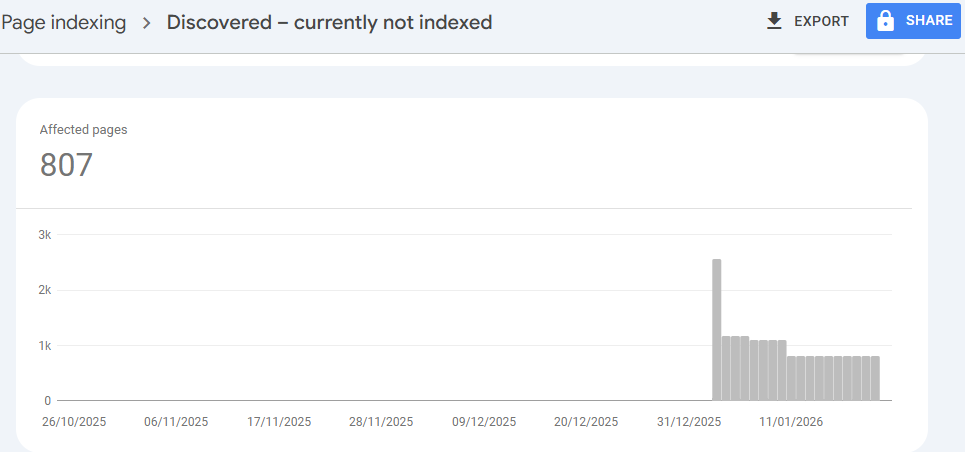
According to Google's official documentation, the "Discovered - currently not indexed" status means that the page was found by Google, but not crawled yet.
Typically, Google wanted to crawl the URL, but this was expected to overload the site; therefore, Google rescheduled the crawl. This is why the last crawl date is empty in the report.
In simpler terms: Google knows this page exists (likely found via your XML Sitemap or an internal link), but it hasn't sent Googlebot to actually look at the content yet. It is essentially sitting in a queue, waiting for its turn.
This distinction is critical for any Technical SEO Consultant to understand: unlike other errors where Google has seen the page and rejected it, here, Google simply hasn't "knocked on the door" yet.
"Discovered - currently not indexed" vs "Crawled - currently not indexed"
It is easy to confuse these two statuses, but the difference dictates your strategy.
- Crawled - currently not indexed: Googlebot has visited the page, analyzed the content, and decided not to put it in the index (often due to quality or duplication issues). You can read my full guide on What Is Crawled Currently Not Indexed And How To Fix This Issue? for a deeper dive.
- Discovered - currently not indexed: Googlebot has not visited the page yet. It knows the URL exists (likely from your sitemap or internal links), but it has not crawled the content. The page is effectively stuck in the "waiting room."
Common Causes Why Pages Remain "Discovered" But Not Indexed
Before we jump into the fixes, we need to diagnose the root cause. As I often find during my Technical SEO Audit Services, this issue usually stems from three main areas:
1. Crawl Budget Limitations
If you have a massive website (like large Ecommerce stores or Programmatic SEO projects), you might be hitting a crawl budget ceiling. Google allocates a certain amount of resources to crawl your site. If you have millions of URLs but low authority, Google will prioritize what it crawls.
Note: If you are unsure how Google allocates resources to your site, check my guide on Crawl Budget: Definition, Importance & Optimization Best Practices.
2. Server Performance Issues
Google explicitly mentions "site overload" as a cause. If your server response time is slow, or if your server throws 5xx errors when Googlebot tries to access it, Google will back off to prevent bringing your site down. This "backing off" results in pages lingering in the "Discovered" queue.
3. Poor Internal Linking Structure
Google prioritizes crawling pages that appear important. If a page is buried deep in your site architecture with few internal links pointing to it, Google assigns it a lower priority. It remains "discovered" (perhaps via a sitemap) but isn't deemed urgent enough to crawl immediately.
4. Thin or Duplicate Content Patterns
Even without crawling, if Google detects patterns in your URL structure that suggest low value (like infinite faceted navigation in Ecommerce), it may deprioritize crawling those specific clusters.
How To Fix "Discovered - currently not indexed"
Fixing this issue requires a systematic approach, moving from technical server health to content strategy. Here is how I approach this for my clients.
1. Check Server Health and Load
Your first step is ensuring your server can handle Googlebot.
- Review Server Logs: Look for times when Googlebot encountered connection timeouts or 503 errors. You can learn how to do this in my Complete and Definitive Guide for Log File Analysis In SEO.
- Improve Page Speed: If your Time to First Byte (TTFB) is high, upgrade your hosting or optimize your database queries.
2. Optimize Your Crawl Budget
If you are running a large-scale site, you must ensure Google isn't wasting crawl budget on useless pages.
- Robots.txt: Block non-essential parameters, search results pages, or admin login pages.
- Clean Up "Zombie" Pages: Remove or redirect old, low-value pages to free up budget for new content.
3. Improve Internal Linking
You need to signal to Google that these "Discovered" pages are important.
- Add Contextual Links: Link to the unindexed pages from high-authority pages on your site.
- Breadcrumbs and Navigation: Ensure these pages are reachable within 3-4 clicks from the homepage.
- Update Sitemaps: Ensure your XML sitemap is clean (no 404s or redirects) and valid. Ref: Best Practices For XML Sitemaps In SEO.
4. Address Content Quality and Duplication
Sometimes, the issue isn't technical but strategic.
- Programmatic SEO: If you have generated thousands of pages automatically, Google might be skeptical of their value. Ensure your Programmatic SEO strategy focuses on unique value, not just keyword multiplication.
- Ecommerce Variations: For online stores, having thousands of product variants (colors/sizes) can bloat the crawl queue. Specialized Ecommerce SEO Services often involve implementing proper canonical tags or handling faceted navigation via JavaScript or robots.txt to prevent this bloat.
5. Review JavaScript Rendering
If your site relies heavily on client-side rendering (CSR), Google might be discovering links in the initial HTML source but struggling to render the full page efficiently to prioritize the crawl.
- This is common in modern web frameworks (React, Vue, Angular).
- If you suspect your rendering path is blocking indexation, you may require specialized JavaScript SEO Services to implement Dynamic Rendering or improve Hydration processes.
What is the difference between 'Discovered - currently not indexed' and 'Crawled - currently not indexed?
While both statuses result in your pages being excluded from Google Search results, the root cause—and therefore the solution—is fundamentally different. In my experience providing Technical SEO Audit Services, confusing these two statuses is the most common reason why webmasters fail to fix indexing issues.
The difference lies entirely in Googlebot's behavior:
1. The Key Distinction: Did Googlebot Enter?
- Discovered - currently not indexed: Googlebot has not entered the page yet. It knows the URL exists (likely from your sitemap or internal links), but it has not crawled the content. The page is effectively stuck in the "waiting room."
- Crawled - currently not indexed: Googlebot has visited the page, downloaded the HTML, and analyzed the content. However, after this analysis, Google decided the page was not worth adding to the index.
2. The Root Cause
Because the bot behavior is different, the underlying problems are usually distinct:
- "Discovered" = Capacity Issue: This is usually about Crawl Budget or server limitations. Google wants to visit, but it is either being polite to your server (to avoid overloading it) or it doesn't view the URL as important enough to prioritize in the crawl queue right now.
- "Crawled" = Quality/Value Issue: This is usually about Content Quality. Google saw the page and determined it was thin content, a near-duplicate of another page, or simply didn't provide enough unique value to the user.
For a deeper dive: If you are seeing the latter error, I highly recommend reading my detailed guide on What Is Crawled Currently Not Indexed And How To Fix This Issue?, where I break down quality signals and content thresholds.
Summary Comparison Table
To simplify the diagnosis, here is how I categorize these two issues when auditing a client's GSC coverage report:
| Feature | Discovered - currently not indexed | Crawled - currently not indexed |
|---|---|---|
| Googlebot Visit | No (Pending) | Yes (Completed) |
| Content Analyzed? | No | Yes |
| Primary Culprit | Server Load / Crawl Budget / Poor Linking | Content Quality / Duplication / Technical Blocks |
| Typical Fix | Improve Server Speed & Internal Linking | Improve Content Uniqueness & Remove Duplicates |
| Service Needed | Technical SEO Audit (Infrastructure focus) | Technical SEO Audit (Content/Quality focus) |
Understanding this distinction saves you time. You shouldn't waste time rewriting content for a "Discovered" page because Google hasn't even read the current content yet.
Conversely, you shouldn't waste time optimizing server logs for a "Crawled" page, because Google already accessed it successfully but rejected it.
When Should You Be Worried?
Not every "Discovered - currently not indexed" status is a disaster.
- New Websites: It is normal for a brand new domain to have pages in this state for a few weeks as Google gets to know the site.
- Safe Migrations: After utilizing Safe Website Migration Services, you might see a temporary spike in this status as Google processes the new URL structure.
However, if this status persists for weeks or affects your key money pages, it is a sign that Google does not trust your server stability or the value of your content enough to invest resources in crawling it.
Final Words about Discovered - currently not indexed issue
The "Discovered - currently not indexed" warning is Google's way of telling you: "We know you are there, but we are too busy (or you are too slow) for us to visit right now."
By optimizing your crawl budget, stabilizing your server, and strengthening your internal linking, you can move these pages from the "waiting room" into the index.